


Wake Industrial Rexroth Controller Repair Services
When your Bosch Rexroth (Indramat) controllers malfunction, every minute of downtime counts. Wake Industrial specializes in Rexroth controller repair, offering comprehensive diagnostics, refurbishments, and replacements for legacy and modern controller models. This includes Indramat’s classic CLM series positioning controllers, the multi-axis CLC motion controllers, and the advanced HCS IndraDrive servo drive controllers. In this guide, we detail common fault codes for each of these controller types and how to diagnose or fix them, so you can better understand what’s wrong with your system. (Remember: if a fault persists or hardware service is needed, Wake Industrial is your go-to source for fast, expert repair – get in touch for a repair, replacement, or refurbishment quote today by contacting Wake Industrial for a quote via the form on the page or by calling 1-919-443-0207.)
CLM Controllers – Indramat Axis Positioning Control Modules
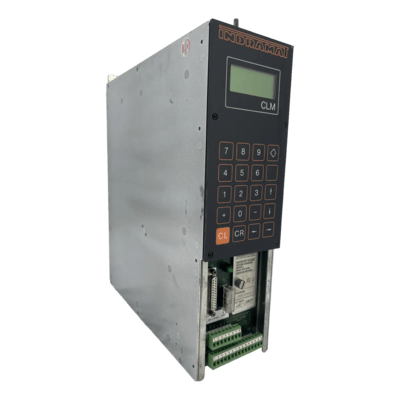
The CLM 01.3-X-0-2-0-FW controller features two-axis control with incremental or absolute encoders. The model offers a four-line LCD display, 64 inputs, and 32 outputs, and weighs 6 kg.
Bosch Rexroth’s Indramat CLM controllers are legacy CNC positioning controls used in roll-feed systems, thermoformers, printing presses, woodworking and more. CLM units are stand-alone motion controllers that work with Indramat servo drives (like TDM, TVM power supplies, etc.) to execute precise axis movements without needing an external PLC. There were three generations – CLM 1.2, 1.3, and 1.4 – the 1.2 being a basic unit, 1.3 adding a removable firmware module with battery backup, and 1.4 being the final improved version. All CLMs provide a small LCD display and keypad, which show status and error messages to inform the operator of system conditions.
When a CLM controller detects a problem, it will display an error code or message on its screen. Here are some frequent CLM issues and fault codes, along with tips to diagnose and resolve them:
Common CLM Fault Codes and Fixes
| Fault Code / Message | Meaning | Diagnosis | Suggested Solution |
|---|---|---|---|
| E206 | Battery Low | Backup battery voltage is low, risking memory loss | Replace the battery; reload parameters if needed |
| E400 | Emergency Stop Activated | E-stop button pressed or safety circuit tripped | Reset the E-stop and verify safety interlocks are closed |
| E412 | No Drives Found on SERCOS Ring | Communication to drives lost | Check fiber-optic cables and ensure all drives are powered and properly addressed |
| E414 | Parameters Were Lost | Parameter memory was erased or corrupted (dead battery likely) | Reload parameters and programs; replace the battery |
| "Cam X is invalid or not stored" | Cam profile is missing or invalid | Cam profile not downloaded or incorrect cam index used | Load correct cam profile and verify cam number is valid |
| Axis Not Referenced | Axis must be homed before operation | Axis hasn’t been referenced since power-up | Perform homing routine |
| Position Limit Reached | Axis exceeded programmed travel limits | Move command too large or physical obstruction | Adjust motion program or remove obstructions, then reset fault. |
Wake Industrial’s CLM Repair Services: CLM modules, despite their age, are robust controllers – many are decades old and still in service. If your CLM controller is showing persistent errors or hardware failures (such as no display, faulty keypad, or communication issues), our team can help. In cases of irreparable damage, we can often provide refurbished CLM units. Contact Wake Industrial to minimize downtime – Send an email to sales@wakeindustrial.com during business hours to receive a comprehensive, industry competitive quote within 15 minutes.
CLC Controllers – Multi-Axis Motion Control Card Diagnostics
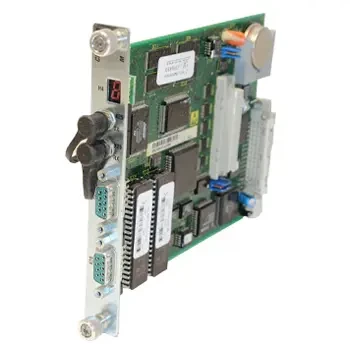
The CLC-D02.3M-FW manufactured by Bosch Rexroth Indramat features 2 serial ports and 2 SERCOS fiber ports. This card weighs 0.32 kilograms.
Bosch Rexroth’s CLC motion controllers are advanced SERCOS-based control card (or module) that interfaces with multiple drives over fiber optics for synchronized motion across several axes. Indramat CLCs came in three main form factors: CLC-D cards (for Diax drive racks and CCD cages), CLC-P cards (plug-in for industrial PC ISA slots), and CLC-V cards (VME bus modules). Regardless of form, all CLCs run Indramat’s VisualMotion firmware (for general automation) or Synax firmware (tailored for printing press control). They also carry a battery (for program memory). When a CLC controller faults out, it will display an error code on the machine’s HMI or in the diagnostic software. Understanding these codes helps pinpoint whether the issue is a simple maintenance item or something requiring deeper repair.
Indramat CLC error codes follow a pattern similar to CLM/drive codes, often prefixed with “E”. The codes are numeric and indicate whether it’s a warning or a critical shutdown. In fact, E200–E399 on a CLC are warning messages, while E400–E999 are shutdown errors that stop the system for safety. Here are a few common CLC errors you might encounter:
Common CLC Fault Codes and How to Fix Them
| Fault Code | Meaning | Diagnosis | Suggested Solution |
|---|---|---|---|
| E206 | Low Battery Warning | Internal battery voltage low, risking loss of stored data | Replace the battery with power on (if supported), otherwise reload backups |
| E830 | Motion Range Exceeded (Shutdown) | Commanded movement beyond travel limits or jammed axis | Check motion program and physical axis range, then reset and retry |
| E400 | Emergency Stop | E-stop activated manually or by drive fault | Inspect E-stop circuitry and any cascading drive faults, then reset |
| E412 | Drive Communication Error | No response from drives on SERCOS loop | Verify fiber ring closure, drive power, and unique addressing |
| E483 | Parameter Initialization Error | Parameters not properly initialized or incompatible | Reload parameters or re-initialize configuration |
| E492 | Programs Were Lost | Program memory lost due to dead battery or memory fault | Re-load programs from backup |
Wake Industrial’s CLC Support: Troubleshooting CLC controllers can be challenging, as these cards are now considered obsolete by the OEM. Wake Industrial’s engineers have experience with Indramat CLC-D, CLC-P, and CLC-V units and the VisualMotion operating system. If your CLC is beyond repair, we can often provide a refurbished replacement CLC module. Don’t let a CLC fault leave your line down – contact Wake Industrial for a fast repair or exchange to get your multi-axis system back online. Click here to navigate to the quote form on this page to place a quote for repair or replacement.
HCS IndraDrive Controllers – Fault Codes, Troubleshooting, and Repair
The HCS01.1E-W0018-A-03-B-ET-EC-NN-NN-NN-FW drive controller has an output current rating of 7.6 A and includes a MultiEthernet communication module.

Modern Bosch Rexroth servo systems use the IndraDrive family of drives, and the HCS series are the drive controllers in the IndraDrive C line (compact standalone drives). Models like HCS01, HCS02, HCS03, HCS04 are commonly found in precision automation, each integrating power electronics and control in one unit. When an HCS drive faults, it will typically display an alphanumeric code on its front display (and also relay it to the PLC or HMI). IndraDrive fault codes begin with a letter followed by numbers – e.g. “F” codes indicate Faults (which stop the drive), while “E” codes are Warning diagnostics that don’t necessarily stop motion. Notably, IndraDrive uses different ranges to categorize faults by severity: F2xxx faults are minor recoverable errors, higher ranges like F4xxx, F8xxx, F9xxx indicate more severe conditions. Below we cover some of the most common HCS IndraDrive fault codes, what they mean, and how to address them:
HCS IndraDrive fault codes
| Fault Code | Meaning | Diagnosis | Suggested Solution |
|---|---|---|---|
| F218 | Drive Overtemperature | Cabinet cooling failure, clogged filters, or overloaded drive | Improve ventilation, clean filters, replace failed fans |
| F219 | Motor Overtemperature | Overload, poor airflow, or fan failure on motor | Cool the motor, repair fan, reduce load if needed |
| F226 | Undervoltage on DC Bus | Mains power dip or internal power supply failure | Check power wiring and facility voltage; reset once power stabilizes |
| F229 | Encoder Quadrant Error | Feedback signals inconsistent due to noise or cable issue | Check encoder cable, reseat connectors, improve shielding |
| F860 | Overcurrent (Phase Short) | Short circuit between motor phases or damaged drive output | Test motor cables with megohmmeter, inspect motor and drive for damage |
| F861 | Ground Fault (Earth Short) | Short to ground from motor or cable | Test motor and cable insulation to ground |
| F220 | Bleeder Overtemperature | Braking resistor is undersized or overheated | Add external resistor or lengthen decel ramp |
| C204 | Motor Type Mismatch | Motor parameters don’t match connected motor | Load correct motor parameters or enable auto-identification |
| C201/C202 | Invalid Parameter Data | Parameter values out of range or corrupted | Restore factory defaults or correct the parameter set |
| F4001/F4002 | SERCOS Communication Loss | Fiber connection loss or incorrect phase configuration | Reseat fiber cables, verify node addresses and bus status |
Fast Repairs & Replacements for HCS Drives: An HCS fault can bring your production line to a standstill, but Wake Industrial is equipped to respond rapidly. Our technicians have deep knowledge of Bosch Rexroth IndraDrive fault codes and the underlying causes. If a drive is beyond repair or you can’t afford downtime, ask about our advance exchange program – we can ship you a refurbished HCS unit from our stock to swap in, getting you running while we repair your original. Click here to navigate to our repair page.
Trust Wake Industrial for Rexroth Controller Repair, Replacement & Refurbishment
Wake Industrial has years of experience servicing Bosch Rexroth (Indramat) automation products, from legacy CLM/CLC controls to the latest IndraDrive servo systems. We understand the fault codes and failure modes described above, and – more importantly – we know how to fix them. Our repair process includes thorough evaluation, replacement of failed components with high-quality parts, and full-load testing.
Don’t let fault codes and downed drives stress you out. Contact Wake Industrial today for expert Rexroth controller support. From repair and refurbishment of your existing units to providing replacement controllers fast, we are committed to getting your automation system back up and running with minimal downtime. Reach out via our website or call us at 1-919-443-0207 for a repair quote. Let Wake Industrial be your go-to partner for all Bosch Rexroth controller repairs – keeping your operations efficient, safe, and productive.
Popular Rexroth Products
XCS Single Axis CtrlX Converters
XM21 IndraControl Systems
VT 2000 Proportional Amplifiers
FCS Frequency Converters
BTA20 Machine Control Boards
ctrlX CORE Control Platforms
HDC DuraDrive Controllers
NFD Mains Filters
Request a Quote

Cary, NC 27513











