


Connecting Bosch Rexroth Motors to IndraDrive C (HCS) Drives – Setup and Backup Guide
10 July, 2025 | Bosch Rexroth Motors, IndraDrive C, HCS Drive, MSK, 2AD, ADF, MAD, MAF, HCS02.1E-W0028, HCS03.1E-W0100-A-05-LNBN, MSK030B-0900-NN-M1-UG1-NNNN, 2AD100D-B05OA7-AS03-D2N1
Wake Industrial is sharing information sourced from the original manufacturer's manual. Please be advised that Wake Industrial does not offer troubleshooting assistance through phone or email. For repair, replacement, or refurbishment needs, we invite you to use our quote form or call us at 1-919-443-0207. It is the user's responsibility to exercise independent judgment and caution when implementing these instructions. Wake Industrial shall not be held liable for any direct, indirect, incidental, or consequential damages to products or individuals resulting from the use of this information.
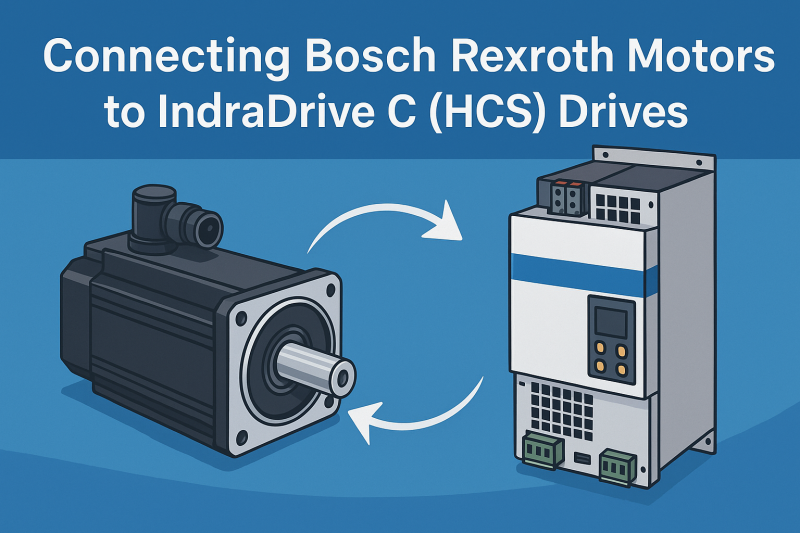
Bosch Rexroth’s IndraDrive C servo drives are a popular choice for powering industrial motors in single-axis applications. These compact drives integrate both the inverter and power supply into one unit, eliminating the need for a separate supply module. The result is a space-saving all-in-one drive that takes in AC mains, creates a DC bus internally, and outputs controlled AC power to drive motors. Engineers, plant operators, and business owners appreciate IndraDrive C for its high performance and simplified installation – you can wire it directly to mains and motors without extra external components. This guide will dive into how to connect Bosch Rexroth motors to IndraDrive C HCS drives and how to back up and save drive settings. We’ll focus on which motor models pair with IndraDrive C, the steps for wiring and configuring them, and methods to secure your drive’s parameter settings.
For help with repairing or replacing your HCS and other IndraDrive Products, contact Wake Industrial at 1-919-443-0207. To receive a quote within 15 minutes, use the quote form at the top of the page. (Wake Industrial is an independent supplier – not an authorized Bosch Rexroth distributor)
IndraDrive C HCS Drives and Compatible Motor Models
IndraDrive C (HCS series) drives are designed to work with a wide range of Bosch Rexroth motors. Compatibility spans both synchronous servo motors and asynchronous induction motors, covering legacy models and newer IndraDyn series. In fact, Rexroth’s documentation lists nearly all popular motor families as “appropriate” for IndraDrive C, including classic Indramat servomotors like the MHD, MKD, MKE series, the latest IndraDyn S motors (e.g. MSK series), high-speed spindle motors like 2AD/ADF, asynchronous servo lines such as MAD/MAF (IndraDyn A), linear motors (IndraDyn L), and even high-torque direct-drive motors. In practical terms, this means an IndraDrive C drive can run everything from the small MSK030B-0900-NN-M1-UG1-NNNN servo motor on a packaging machine to a large 2AD100D-B05OA7-AS03-D2N1 induction motor on a machine tool spindle.
One reason for this broad motor support is the IndraDrive C’s flexible control electronics and multi-encoder interface. These drives can interface with numerous feedback types – from standard digital encoders and resolvers to high-resolution protocols like EnDat or Hiperface. In many cases, the drive will auto-detect the motor when initially connected. Bosch Rexroth servo motors come with an electronic nameplate stored in the encoder memory for example, Indramat motors like the MKD/MHD series include data about their motor characteristics. Upon first powering up, the IndraDrive C reads this encoder memory and can automatically load the correct motor parameters – essentially a plug-and-play setup for Rexroth’s own IndraDyn motors. This is a huge time-saver for engineers: the drive knows the motor’s rated current, torque constant, feedback resolution, etc., without extensive manual entry. For instance, an MSK servo motor paired with an HCS drive will be recognized and the appropriate parameter set is applied automatically. If you’re using a third-party motor or a non-standard configuration, the IndraDrive’s software allows manual parameter input, but Rexroth has made it straightforward to use their motors by providing predefined motor files and encoder data.
It’s important to select the right size IndraDrive C for your motor. IndraDrive C units span a broad power range – from fractional kilowatt HCS01/Cs drives for small motors, up to high-power HCS04 converters for large machines. Each drive is rated for a certain continuous output current and power. For example, a mid-range HCS02.1E-W0028 IndraDrive C has a maximum output of 28 A, which makes it suitable for servo motors in roughly the 5–7.5 kW range. On the higher end, an HCS03.1E-W0100-A-05-LNBN model rated around 100 A continuous can drive a sizable servo motor, such as one used in an extrusion line or machine tool, without breaking a sweat. Always check that the drive’s voltage and current ratings meet or exceed your motor’s requirements. The IndraDrive C series supports standard 3-phase supply voltages from ~200 VAC up to 500 VAC, covering most global mains systems, and offers models with internal braking choppers to handle regenerative energy when stopping high-inertia loads. In short, whatever Bosch Rexroth motor you are working with there’s likely an IndraDrive C HCS drive that can run it efficiently.
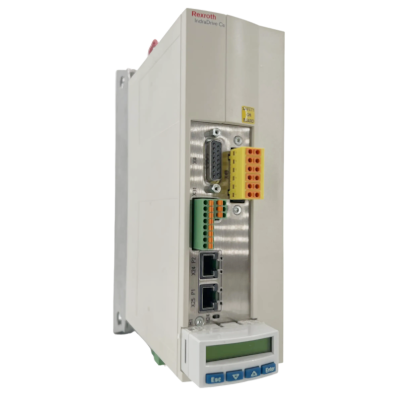
The HCS01.1E-W0028-A-03-A-CC-EC-NN-L4-NN-FW Compact Converter is manufactured by Rexroth Indramat Bosch. This converter has an Internal Air cooling mode and a 28 AA Maximum Current.
Connecting Bosch Rexroth Motors to IndraDrive C Drives
Physical wiring and connection of the motor to the IndraDrive C is the first step in commissioning. IndraDrive C drives come with clearly labeled terminals/connectors for mains input, motor output, feedback, and auxiliary signals. Before starting, ensure all power is off and proper lockout/tagout procedures are followed – safety first. Then proceed with connecting the following key interfaces between the drive and motor:
- Motor Power Connections: The motor’s three-phase power leads (U, V, W) plus ground must be connected to the drive’s motor output terminals. On most HCS drives, these power terminals are robust screw or clamp connectors designed for the motor cable gauge. The cable shielding should be bonded to ground at both ends (drive and motor) over a large surface area to ensure good EMI/RFI suppression. Bosch Rexroth specifies using shielded motor power cables for IndraDrive systems. Keep the motor cable run separate from signal lines and avoid long parallel runs with other cables to reduce electrical noise coupling. If the motor is distant, note that there are maximum cable length guidelines depending on the drive’s switching frequency (higher switching frequencies allow shorter cable lengths) – typically standard lengths up to 25m or 50m are fine, but check the manual if you have an unusually long cable run.
- Motor Feedback Connection: Almost all servo motors require a feedback device connection to the drive for closed-loop control. Rexroth motors commonly use encoders that could be incremental, absolute or resolvers. The IndraDrive C has a dedicated multi-pin encoder port (for example, connector X8 on many HCS drives serves as the encoder interface). This port receives the signals from the motor’s encoder or resolver. Carefully connect the motor’s feedback cable to this port, ensuring the connector keys align and locking screws are tightened. The cable’s shield should also be clamped to the drive’s chassis ground (there is usually a shield grounding bracket or clamp near the encoder connector, labeled as XS1 on some models). Once connected, the drive’s control unit will be able to read the motor’s position and speed from the encoder. As mentioned earlier, if it’s a Rexroth motor with an electronic nameplate, the drive may automatically pull in motor ID and calibration data from this interface on power-up. If the motor uses a third-party encoder, you might need to configure the encoder type in the drive parameters.
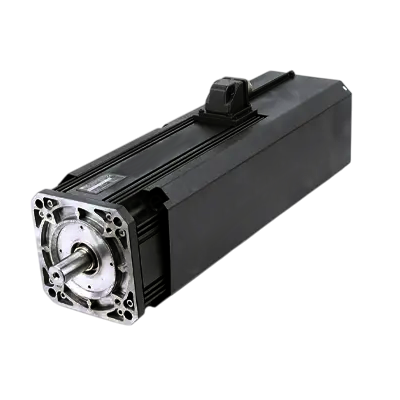
The 2AD100D-B05OA7-AS03-D2N1 is a compatible model with HCS Drives.
- Motor Brake and Thermal Sensor: Many servo motors include an integrated holding brake and a temperature sensor. IndraDrive C drives provide a separate connector – often labeled X6 – for these auxiliary motor connections. The brake is typically a 24 VDC coil that needs a power supply. The IndraDrive C does not necessarily source this power from the main unit; usually, you supply 24 V to the drive’s control voltage input which in turn feeds the brake output circuit. Wire the motor’s brake leads to the designated brake terminals at X6, observing polarity if specified. The motor’s thermal sensor also connects at X6 – this allows the drive to trip an alarm if the motor exceeds safe temperature. Ensure the brake and temp sensor wiring is routed through the proper connector insert on the drive and is secure. Once wired, the drive will be able to control the brake under program control and monitor motor temperature to prevent damage.
- AC Mains and Control Power: IndraDrive C units require appropriate supply power. Connect the 3-phase AC mains to the drive’s input terminals (often labeled L1, L2, L3 or R/S/T). These drives are designed for direct connection to standard industrial power feeds. Check the drive nameplate for the acceptable voltage range and ensure an upstream circuit breaker or disconnect is in place per electrical codes. In addition to mains, most IndraDrive C models have a separate 24 V DC control power input that powers the control electronics and maintains the logic even if mains power is off. This 24 V input is also used to release the motor brake. Connect a regulated 24 V supply to the control power terminals as instructed by the manual. This dual-supply scheme allows you to power the drive’s control section independently, which is useful for being able to communicate with the drive or keep the brake on while the main power stage is off. Once mains and control power are wired, you can power up the drive – it should initialize, and if all is well, you’ll get a status indication. If the motor and feedback were correctly connected, the drive will either automatically configure basic motor parameters or prompt a commissioning sequence.
With everything wired up, the next step is configuring the drive for the motor. If you are lucky and using a fully plug-and-play Rexroth motor, the IndraDrive C will have already loaded default motor parameters from the encoder memory. You will still need to verify and fine-tune settings such as motor polarity, servo tuning gains, and any application-specific limits. Using Bosch Rexroth’s software (IndraWorks Ds or the older DriveTop for legacy units) makes this process easier – you can connect a PC to the drive via Ethernet or serial to view and adjust parameters. In the software or via the drive’s control panel, check that the motor name/model is correctly identified. For instance, confirm the motor’s continuous current rating matches the nameplate, the resolver or encoder type is set correctly, and the feedback is giving proper position readings. If the motor was not recognized automatically, you’ll need to manually input the motor data. This includes values like motor type or model code, rated torque, motor inertia, etc. Bosch Rexroth provides motor datasheets and a motor database in IndraWorks to help with this. Setting these correctly is crucial – it allows the drive’s control loops to be tuned properly and ensures the servo performs as expected. After inputting the data, you can run an encoder reference or alignment procedure if required. Finally, perform a test run or basic motion command at low speed to verify the motor is spinning correctly. Keep an eye on the drive’s status display for any fault codes – if a fault occurs, re-check the wiring and parameters before proceeding.
If you require replacement parts, you can reach out to Wake Industrial by calling 1-919-443-0207 for prompt assistance. We carry a selection of IndraDrive C HCS drives and Rexroth motors and offer repair services to get your production up and running quickly.
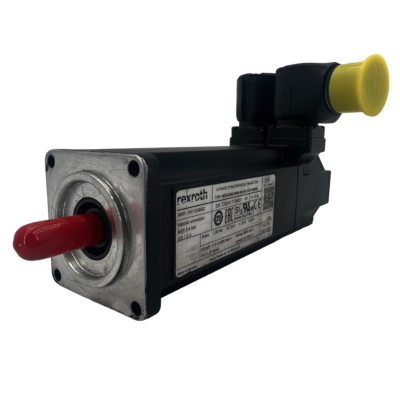
The MSK030B-0900-NN-M1-UG1-NNNN is a robust and versatile synchronous servomotor from Bosch Rexroth Indramat. One of many compatible motors with IndraDrive C HCS Drives.
Backing Up and Saving Drive Parameter Settings
Once your IndraDrive C and motor are up and running with the correct configuration, it is critical to back up the drive’s parameter settings. Industrial servo drives like the IndraDrive C are highly programmable, and the optimal tuning and configuration you’ve established represent hours of work and fine-tuning. Losing those settings due to an unexpected failure or user error could mean significant downtime. Fortunately, Bosch Rexroth provides tools to easily save and restore drive parameters, and it’s good practice to do this anytime you commission a drive.
There are a couple of common methods to back up the parameters on an IndraDrive C:
- Using PC Software (IndraWorks or DriveTop): Rexroth’s commissioning software allows you to connect to the drive and upload its parameter set to your PC. With IndraDrive C, you would typically use IndraWorks Ds (for newer drives) – for older Indramat interfaces, the DriveTop software can also work. Once connected to the drive, look for a function to “upload” or save parameters to file. For example, in DriveTop there is an Upload Parameters command that will read all the current drive settings and let you save them as a file on your computer. IndraWorks has a similar capability, often called “Save Parameter File” or part of the Project save. This PC backup is extremely useful: if the drive ever needs to be replaced or reset, you can simply download the saved file to restore all your settings in one go, rather than manually re-entering dozens of values. It’s also handy for cloning the configuration to an identical drive. We recommend keeping multiple copies of these parameter files and documenting which machine or axis they correspond to.
- Using the IndraDrive C Control Panel: Many IndraDrive C units come with an optional “comfort control panel” – a small display/keypad module on the front of the drive. This panel not only allows viewing status and adjusting parameters on-site, but it also has a built-in memory (or uses an attached memory card) that can serve as a programming module. There is a feature to save or copy the entire parameter set from the drive onto this control panel module. For example, you could plug the panel into a drive, issue a “Copy parameters to panel” command, and then move the panel to another drive and upload the parameters there. The Bosch Rexroth manual describes a procedure where you plug the control panel with a copied parameter set into the target drive and reboot it to load the parameters. This is particularly helpful for device replacement scenarios: if a drive fails, you can transfer the panel to the new drive and quickly commission it with the old settings. On some IndraDrive versions, you might encounter terms like “Snapshot”, “Device Replacement”, or “Commissioning” modes for the parameter backup via the panel – these are options that determine what exactly is saved. The key point is that the drive’s front panel can be used as a convenient portable backup device. Just be sure to store the panel or memory card safely if you remove it, and keep track of which parameter set it contains.
No matter which backup method you use, make it a routine part of your maintenance. Bosch Rexroth actually advises saving the parameter set before any firmware update or major change to the drive. In practice, after you’ve tuned the motor, set the limits, and the system is running smoothly, take a few minutes to create a backup. It’s a small time investment that can save hours or days in the future. Imagine a scenario where a surge or fault damages the drive – having the parameters backed up means you can replace the unit (with a reconditioned HCS drive from Wake Industrial, for example) and restore settings in a snap, rather than starting from zero. Similarly, if an accidental parameter change is made that throws the system off, you can revert to the saved file.
When backing up, it’s wise to also note the firmware version of your IndraDrive C. Parameters are tied to specific firmware features, and while Rexroth maintains good backward compatibility, restoring a parameter file to a drive with a different firmware revision could sometimes lead to compatibility warnings. If you source a replacement drive, try to match the firmware, or be prepared to update the firmware so that your parameter set works seamlessly.
Conclusion – Reliable Operation and Support for IndraDrive C and Motors
Bosch Rexroth’s IndraDrive C HCS series drives offer a powerful and flexible solution for running a variety of servo and spindle motors in industrial settings. By properly connecting the motor power, feedback, and auxiliaries, and taking advantage of features like electronic nameplate recognition, engineers can get these systems up and running with minimal hassle. Equally important is safeguarding the drive configuration through regular backups of parameters, which protects your tuning work and ensures fast recovery from any hardware issues.
Wake Industrial is here to support your IndraDrive C and Bosch Rexroth motor needs at every step. We specialize in industrial motion control products – offering repair services and replacement units for the entire IndraDrive C HCS family and the motors they run. If your drive fails or a motor needs replacing, Wake Industrial can provide a fully tested refurbished unit or a professional repair to get your line back up. We maintain an inventory of HCS drives (from small HCS01 to large HCS04 models) and compatible servo motors, all backed by our standard one-year warranty. Our knowledgeable team has worked with countless Rexroth/Indramat systems, so we can assist you in selecting the right drive-motor combination, configuring it, and even retrofitting older machines with newer components.
If you have questions or need a quote for IndraDrive C drives, motor repairs, or spare parts, contact Wake Industrial today. Our team can be reached by phone at 1-919-443-0207 or by emailing sales@wakeindustrial.com – we pride ourselves on quick response times and straight forward pricing. Let us partner with you to ensure your Bosch Rexroth motion control systems remain a dependable backbone of your operations, with minimal downtime and maximum performance.
Wake Industrial is your partner in progress.
(Wake Industrial is an independent supplier – not an authorized Bosch Rexroth distributor)
Wake Industrial is sharing information sourced from the original manufacturer's manual. Please be advised that Wake Industrial does not offer troubleshooting assistance through phone or email. For repair, replacement, or refurbishment needs, we invite you to use our quote form or call us at 1-919-443-0207. It is the user's responsibility to exercise independent judgment and caution when implementing these instructions. Wake Industrial shall not be held liable for any direct, indirect, incidental, or consequential damages to products or individuals resulting from the use of this information.
Request a Quote

Cary, NC 27513












