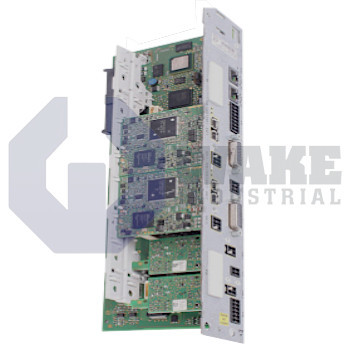
CDB02.1B-ET-EC-EC-NN-S4-S4-NN-NN-FW

MPN: R911338542

No Tariffs On US Orders
  • Straightforward Pricing: No Rush Fees, No Credit Card Fees
    In-Stock, Ships 1-2 Days

Preparing your secure checkout page...

The CDB02.1B-ET-EC-EC-NN-S4-S4-NN-NN-FW control unit is manufactured by Bosch Rexroth Indramat. The unit utilizes MultiEthernet as its form of master communication, and it is equipped with multi-encoder interface options.

Quote Request Form:

Warranty
Wake Industrial Warranty
To contact sales for pricing and lead time:

Payment Methods

Visa
Mastercard
AmEx
Wire Transfer

Shipping Methods

DHL
UPS
FedEx
Freight

Our Credentials

Cary Chamber
DUNS Registered
SAM Registered
BBB Accredited

Product Description:

Rexroth Indramat Company manufactures the CDB02.1B-ET-EC-EC-NN-S4-S4-NN-NN-FW as part of their CDB02 series of control sections of drive controllers. These drive controllers are used in applications such as machine tools, handling equipment, industrial robotics, food processing machines, and others. The control section comes installed inside the power section and should be mounted and dismounted for a maximum of 20 times. It features a double-axis design with an extended scope and is compatible with HMD01 power sections. It uses FWA-INDRV*-MPx-18VRS firmware or higher. The firmware stores the functions of the drive.

The CDB02.1B-ET-EC-EC-NN-S4-S4-NN-NN-FW features 02 series, one design, Multi-Ethernet communication, and a multi-encoder interface. It comes with two safe motion interfaces. Like other control sections, the firmware is ordered separately. The safe motion safety technology uses cables with a maximum length of 2,500 and should have a length of 100 m between two connection points. With a standard control panel, the service engineer can have extended diagnoses displayed and trigger simple commands. The panel features a single-line display and can be used as a programming module. It comes with four keys and must be plugged in when the drive is switched on so it can recognize it.

The CDB02.1B-ET-EC-EC-NN-S4-S4-NN-NN-FW consumes 23 W at DC 24 V and has a maximum pulse width of 1 ms and a <5 A maximum inrush current. The safe motion modules use 2.5 W each while the Multi-Ethernet module utilizes 2.7 W.  You can use a safety zone module to set up a safety zone with a maximum of 26 drive units. The HAT02 control module is used to control an inductive load such as a hydraulic/pneumatic valve. This Rexroth Indramat control section features a one year warranty from Wake Industrial.

Communication Module
Multi-Ethernet communication
Firmware Type
Ordered Seperately
Interface 1
Multi-encoder interface
Maximum Inrush Current
5 amp
Maximum Installation Elevation
1000 MSL
Maximum Pulse Width
1 ms
Multi-Ethernet Module Power Consumption
2.7 W
Power Consumption
23 W
Safe Motion Module Power Consumption
2.5 W
Series
2
  • CDB021BETECECNNS4S4NNNNFW
  • CDB02 1B ET EC EC NN S4 S4 NN NN FW
  • cdb02.1b-et-ec-ec-nn-s4-s4-nn-nn-fw
Fault / diagnostic code  What it usually means Quick corrective action
F8022 – Encoder 1 signals incorrect Sin/Cos or digital feedback outside tolerance or missing Inspect encoder cable & shielding, reseat the EC-interface plug, verify parameter P-0-0053 (encoder type); reboot and re-enable. 
F8035 – Communication error, encoder-interface modules Telegram loss on the optional EC module bus Power-cycle the drive; check that the EC option card is firmly seated, update its firmware, replace the module if errors persist. 
F8025 – Over-voltage in power section DC-bus > ≈900 V during braking/regeneration Verify braking-resistor wiring and value, lower deceleration ramps (S-0-0044), or add a regenerative supply/ larger bleeder. 
F8060 – Over-current in power section Short-circuit in motor cable or torque demand > Ipeak Check motor leads for shorts, test insulation, reduce torque limit (S-0-0092); replace power section if fault recurs no-load. 
F8070 – +24 V DC error External control-voltage < 21 V / > 30 V Measure the 24 V rail at X31, inspect wiring & PSU, correct voltage and clear the fault.
F8018 – Device over-temperature shutdown Heatsink temperature > 100 °C Improve cabinet airflow, clean filters, allow cool-down, and reduce continuous load. 
F8078 – Speed-loop error Velocity controller cannot follow torque demand (loop instability) Check mechanical load & inertia settings, retune speed loop, and verify that feed-forward values are reasonable. 
F8079 – Velocity-limit value exceeded Actual speed > configured limit (S-0-0091) Reduce commanded speed or raise limit only if the mechanics permit it; then clear fault. 
F8351 – Safely-monitored deceleration exceeded Deceleration in Safe Motion block over the SMD threshold Review safety parameters (S-0-0787, S-0-0789), lengthen decel ramp, or retune braking resistor sizing. 
F8131 – Exception on optional module Internal error on plug-in option (e.g., DA, CN) Reseat or swap the option card; if the error repeats with a known-good module, replace the control section. 
Model Axis channels Integrated fieldbus Safety option(s) Encoder interface(s) Optional slots Stand-out feature
CDB02.1B-ET-EC-EC-NN-S4-S4 2 Multi-Ethernet (SERCOS III, EtherCAT, PROFINET, etc.) S4 + S4 (Safe Motion each axis) Dual EC 4 Compact double-axis, full Safe Motion on both axes 
CSB02.1B-ET-EC-EC-NN-S4-S4-NN-NN-FW 1 Multi-Ethernet S4 EC 3 Single-axis twin of the reference—same performance in half the width
CDB02.1B-ET-EC-EC-NN-L3-L3-NN-NN-FW 2 Multi-Ethernet L3 (STO dual-channel) EC 4 Cost-optimised: STO only, no Safe Motion—good for simple SIL 3 needs
CSB02.1B-ET-EC-EC-L3-L3-NN-NN-FW 1 Multi-Ethernet L3 EC 3 Space-saving single-axis with just STO; easiest drop-in swap for legacy drives
CSH02.1B-ET-EC-EC-L3-NN-NN-FW 1 Multi-Ethernet L3 (STO) EC 3 ADVANCED CPU—62.5 µs current loop & CCD cross-comm capable
CDB01.1C-S3-ENS-ENS-NN-NN-NN-S-NN-FW 2 SERCOS III (S3) S (STO, 1-channel) Dual ENS 3 First-generation double-axis; useful where only SERCOS is required
Error code What it means
F8022 Encoder 1 signals incorrect – cabling, shielding or encoder fault 
F8035 Communication error on encoder-interface module bus 
F8025 Over-voltage in power section (DC-bus too high) 
F8060 Over-current in power section – short circuit or peak current exceeded 
F8070 +24 V logic supply outside 21–30 V tolerance (wakeindustrial.com)
F8018 Device over-temperature shutdown – heat-sink > limit 
F8078 Speed-loop error – velocity controller cannot follow demand 
F8079 Velocity-limit value exceeded (≥ 1.125 × S-0-0091) 
F8351 Safely-monitored deceleration exceeded (Safe Motion SMD) 
F8131 Exception on optional module – plug-in card runtime fault 

Frequently Asked Questions about CDB02.1B-ET-EC-EC-NN-S4-S4-NN-NN-FW:

Q: What is the maximum number of times the CDB02.1B-ET-EC-EC-NN-S4-S4-NN-NN-FW control section can be mounted and dismounted?

A: The control section can be mounted and dismounted a maximum of 20 times. It is installed inside the power section.

Q: Is the CDB02.1B-ET-EC-EC-NN-S4-S4-NN-NN-FW compatible with other power sections?

A: Yes, the CDB02.1B-ET-EC-EC-NN-S4-S4-NN-NN-FW is compatible with HMD01 power sections. It uses a double-axis design with an extended scope.

Q: What firmware is required by the CDB02.1B-ET-EC-EC-NN-S4-S4-NN-NN-FW for optimal functioning?

A: The control section requires FWA-INDRV*-MPx-18VRS firmware or higher. The firmware is responsible for storing the drive's functions.

Q: What is the maximum cable length for the safe motion interfaces of the CDB02.1B-ET-EC-EC-NN-S4-S4-NN-NN-FW?

A: The safe motion safety technology uses cables with a maximum length of 2,500 and must maintain a distance of 100 m between two connection points.

Q: Is the standard control panel of the CDB02.1B-ET-EC-EC-NN-S4-S4-NN-NN-FW programmable?

A: Yes, the standard control panel features a single-line display and can be used as a programming module. It comes with four keys and must be plugged in when the drive is switched on for recognition.


Internal Product Review

  • ‘‘The model has an effective double-axis design and is compatible with various power sections. Firmware is required for full functionality. The model’s control panel is useful for extended diagnoses; must be plugged in during operation.’’

Motion Industries logo
3M logo
IBM logo
Gexpro Logo
Caterpillar logo
NASA logo
Ford logo
Vallen logo