


Kollmorgen S700 Servo Drive Troubleshooting: Fixing Common Faults to Minimize Downtime
20 August, 2025 | Kollmorgen S700 troubleshooting, Kollmorgen, S700, Servostar, Servostar 700, S700 servo drive faults, Kollmorgen S700 error codes, Kollmorgen S700 repair
Wake Industrial is sharing information sourced from the original manufacturer's manual. Please be advised that Wake Industrial does not offer troubleshooting assistance through phone or email. For repair, replacement, or refurbishment needs, we invite you to use our quote form or call us at 1-919-443-0207. It is the user's responsibility to exercise independent judgment and caution when implementing these instructions. Wake Industrial shall not be held liable for any direct, indirect, incidental, or consequential damages to products or individuals resulting from the use of this information.
Looking for the easy to read error table? Click here.
To receive an immediate quote for your S700 drive, contact Wake Industrial by calling 1-919-443-0207 or by filling out the quote form on this page.
Kollmorgen’s S700 servo drives are known for their high performance and advanced features that make them ideal for complex industrial automation tasks. However, even these robust drives can experience faults that bring operations to a halt. For engineers, maintenance teams, and plant owners, quickly troubleshooting common S700 faults is crucial to minimize downtime and avoid costly production losses. We’ll outline Kollmorgen S700 troubleshooting steps for the most common servo drive faults, explain their causes, and recommend solutions. We’ll also discuss when it’s time to seek professional servo drive repair and how Wake Industrial can help with S700 drive repairs or replacements (Wake Industrial is not an authorized Kollmorgen distributor). By understanding these industrial automation faults and remedies, you can keep your equipment running smoothly and make informed decisions to protect your bottom line.
Understanding Kollmorgen S700 Fault Codes
The S700 drive continuously monitors its health and will display error codes (prefixed with “F”) or warning codes (prefixed with “n”) on its front panel display when issues occur. Error codes (F##) indicate critical faults that stop the drive’s operation until the problem is fixed and the fault is cleared. These are the main focus of our troubleshooting because they require immediate attention. Warning codes (n##) are non-critical – the drive can continue running, but they warn of conditions that could lead to faults if not addressed. For example, an overload warning (n01) might precede a drive overheating fault if not corrected. In this guide, we concentrate on the common “F##” fault codes you’re likely to encounter on Kollmorgen S700 servo drives and how to resolve them.
Common Kollmorgen S700 Faults, Error Codes, Causes, and Solutions
|
Fault Code |
Fault Name |
Typical Causes |
Recommended Solutions |
|
F01 |
Heat Sink Overtemperature |
Inadequate ventilation; ambient temperature too high; cooling fan failure. |
Improve cabinet ventilation and cooling; check and clean fans; reduce ambient temperature. |
|
F02 |
DC Bus Overvoltage |
Excess regenerative energy (e.g. fast deceleration without proper resistor); input voltage spikes. |
Install or verify the braking resistor functionality; slow down deceleration ramps to limit regen energy. |
|
F03 |
Following Error |
Motor unable to follow commanded position – possible mechanical binding, excessive load, or tuning issues. |
Inspect load and mechanics for jams or misalignment; retune servo control gains and motion profiles. |
|
F04 |
Feedback Fault |
Feedback device issue – encoder or resolver cable break, loose connection, or configuration mismatch. |
Check and reseat feedback cables and connectors; verify the encoder/resolver configuration in the drive settings. |
|
F05 |
DC Bus Undervoltage |
Supply voltage dropped too low – could be from a mains dip, phase loss, or faulty power supply. |
Check AC mains input for proper voltage and phase; inspect input wiring and contactors; ensure no supply interruptions. |
|
F06 |
Motor Overtemperature |
Motor exceeded safe temperature – due to heavy load, insufficient cooling, or faulty temperature sensor. |
Allow the motor to cool down; improve motor cooling (e.g. add fan or heatsink); reduce load or duty cycle to prevent overheating. |
|
F07 |
Internal Voltages Fault |
Internal power supply issue within drive (low/high internal voltage) – could indicate component failure. |
Power down and disconnect external loads; after restart, if fault persists, internal components may be failing (professional repair likely needed). |
|
F08 |
Overspeed |
Motor speed exceeded limit or ran away – often caused by tuning error or a sudden load change. |
Check that speed/position loop tuning is stable; verify commanded speed limits; inspect for sudden load disturbances. |
|
F09 |
EEPROM Checksum Error |
Parameter memory error – power glitch or firmware issue causing corrupted settings. |
Reload drive parameters from backup; if issue recurs, update or reflash firmware to ensure compatibility. |
|
F12 |
Motor Phase Missing |
One phase of motor power is not conducting – due to cable break, loose connection, or blown fuse. |
Inspect motor power cables and connectors for damage or disconnection; check phase wiring continuity and any fuses. |
|
F13 |
Ambient Overtemperature |
The ambient temperature around the drive is too high, causing the drive to overheat. |
Improve enclosure cooling and ventilation; ensure the drive’s environment stays within specified temperature range. |
|
F14 |
Output Stage Fault |
Power output stage failure – often from shorted motor outputs or drive transistor damage. |
Inspect motor cables for shorts or insulation damage; if fault persists, consider that the drive’s output stage may need repair or replacement. |
|
F15 |
Drive Overload (I²t Max) |
Drive was overcurrent for too long – indicates the drive or motor was pushed beyond capacity. |
Reduce the motion profile’s duty cycle or peak load; consider using a larger drive/motor if the application regularly overloads the current limit. |
|
F16 |
Mains Phase Fault |
Missing phase in AC supply – one or more input phases dropped out or a fuse blew. |
Verify all 3 input phases are present and balanced; inspect incoming power lines, fuses, and disconnects for failures. |
|
F23 |
CAN-Bus Off |
Severe CANopen communication error – network wiring issue or node configuration error. |
Check the CAN bus wiring integrity and termination; verify matching bit rates and unique device IDs on the network. |
|
F27 |
STO Input Error |
Safe Torque Off circuit error – incorrect sequence or wiring on the STO inputs. |
Ensure the STO inputs are wired correctly and the enable/disable sequence meets the drive’s requirements (both STO and Enable signals proper). |
|
F30 |
Emergency Stop Timeout |
E-stop braking did not complete in expected time – possibly due to high inertia load. |
Increase the emergency stop deceleration ramp time or adjust the timeout parameter; check if the load inertia is too large for the set stop time. |
|
F32 |
Internal System Error |
General internal firmware or processing error – the drive’s control system did not respond correctly. |
Try cycling power to the drive to reset the system; if the error recurs frequently, reduce command complexity or consider drive repair if internal fault is suspected. |
When to Repair or Replace an S700 Drive
While many S700 faults can be resolved by adjusting settings or replacing external components, some errors indicate deeper hardware problems. According to Kollmorgen, faults like F07 or F14 strongly suggest a component failure inside the drive that likely requires professional repair or a drive replacement. If you’ve tried the recommended troubleshooting steps for a fault and it continues to persist, or if the same fault keeps reoccurring frequently, it’s a red flag that the drive may be failing internally. For example, an F07 internal voltage fault might mean a power supply section in the drive is unstable, and an F14 as discussed often means a blown power device. In these cases, continuing to troubleshoot on your own can lead to extended downtime.
Instead, it may be time to consider sending the drive for repair or obtaining a replacement unit.
The S70302-NANANA is manufactured by Kollmorgen as part of their S700 Servo Drive Series. These drives feature a Rated line power for S1 operation of 2.2 kVA and a Peak output current of 9 A RMS.
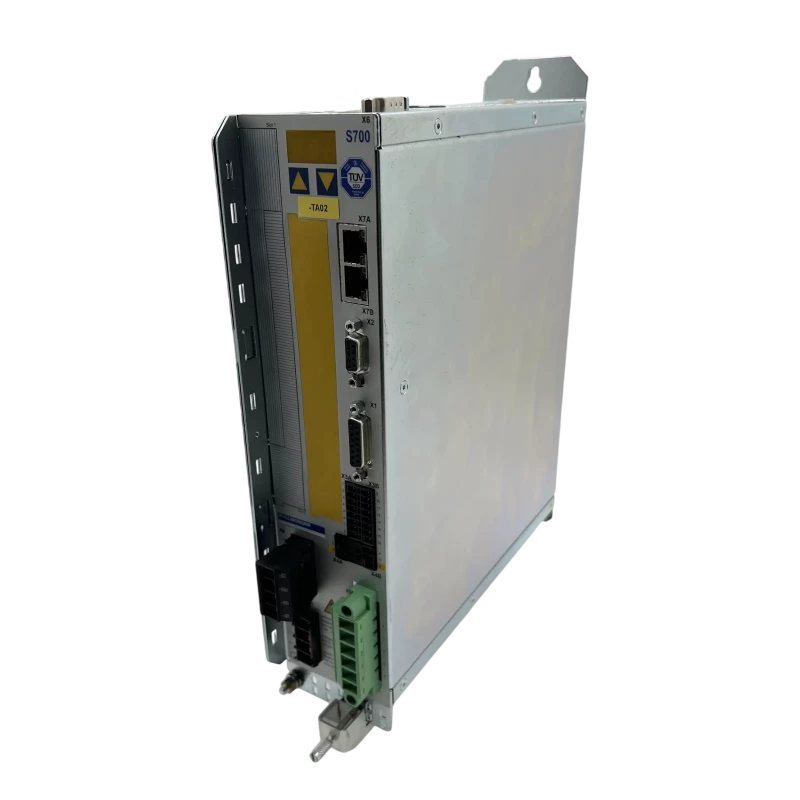
Wake Industrial: Your Partner for Kollmorgen S700 Servo Drive Repair
When a Kollmorgen S700 drive needs professional attention, Wake Industrial is the place that can help get you back up and running fast. (It’s important to note that Wake Industrial is not an authorized Kollmorgen distributor or technical support provider.) They specialize in industrial automation hardware repair and refurbishment, including the full Kollmorgen Servostar drive series (S300, S400, S600, S700, etc.). In fact, Wake Industrial stocks S700 servo drives and critical components, meaning they can often repair your unit or ship a replacement very quickly to minimize your production downtime. To get a repair or replacement from Wake Industrial email sales@wakeindustrial.com or call 1-919-443-0207 to speak with one of our qualified sales representatives.
Repairing a high-end servo drive like the S70302-NANANA can be far more economical than buying a brand-new unit, especially for older models. Wake Industrial provides cost-effective repair options which can stretch your maintenance budget further. If your drive is obsolete or hard to find, their refurbished inventory can be a lifesaver.
By leveraging Wake Industrial for S700 servo drive repair or replacement, you can turn a potentially crippling fault into a manageable downtime event. Gain the Wake Industrial Advantage by calling 1-919-443-0207 to learn how Wake Industrial can support you.
Request a Quote

Cary, NC 27513












