


CSH01.1C-CO-ENS-NNN-MA1-NN-S-XP-FW Bosch Rexroth Indramat
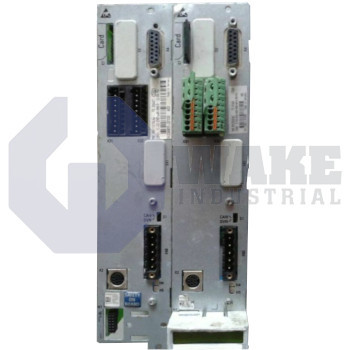
Wake Industrial LLC is not an authorized distributor of this product.
MPN: R911335384
No Tariffs On US Orders- Straightforward Pricing: No Rush Fees, No Credit Card Fees
Current response time:
5 Minutes
53 Seconds
The Bosch Rexroth Indramat CSH01.1C-CO-ENS-NNN-MA1-NN-S-XP-FW is part of the CSH Advanced Controllers series and supports CANopen and DeviceNet control communication, with up to 127 CANopen and 64 DeviceNet nodes. It features two analog input channels and two output channels, both with 12-bit resolution, and offers an ENS encoder supply of 11.6 V at 500 mA.


To contact sales for pricing and lead time:
Payment Methods


Shipping Methods


Our Credentials


Product Description:
The CSH01.1C-CO-ENS-NNN-MA1-NN-S-XP-FW is a motion-logic controller plug-in created by Bosch Rexroth Indramat for the CSH Advanced Controllers series. Installed inside a modular IndraDrive housing, the card manages axis control, feedback evaluation, and fieldbus exchange in automated machinery. It uses the CO-ENS-MA1 slot combination, which adds a CAN communication interface, an encoder processing channel, and an analog I/O module. This arrangement supports coordinated servo positioning and real-time process data exchange in industrial automation cells.
The CO communication section supports CANopen/DeviceNet traffic and can host up to 127 CANopen nodes or 64 DeviceNet nodes on one network, which gives flexibility in network layout. Signal conversion for the sine-cosine encoder is processed through a 12 bit interpolation stage, and the sensor channel can supply up to 500 mA at 11.6 V for external transducers. This allows the motion kernel to receive precise position data while providing enough current for low-impedance encoders without a separate power unit. The communication and feedback functions are combined on one controller card, which helps keep the drive structure compact inside the IndraDrive platform.
To support high-frequency feedback, the card filters sine signals only above 500 kHz and maintains a differential input impedance of 120 Ω. It also provides a bus terminator of 124 Ω, which helps reduce reflections on long encoder or CAN lines. The MA1 option board adds two analog input and two analog output channels on a D-Sub connector, and these channels can be wired through cables up to 15 m when RS-232 diagnostics are required. These interfaces allow the controller to exchange process values and command signals with nearby machine hardware in electrically noisy environments.
Frequently Asked Questions about CSH01.1C-CO-ENS-NNN-MA1-NN-S-XP-FW:
Q: How many CANopen nodes can the CSH01.1C-CO-ENS-NNN-MA1-NN-S-XP-FW controller manage?
A: This model supports up to 127 CANopen nodes for flexible control networking.
Q: How many analog input and output channels are available on this controller?
A: The controller provides 2 analog input and 2 analog output channels for interfacing with sensors and actuators.
Q: What is the analog I/O resolution for the CSH01.1C-CO-ENS-NNN-MA1-NN-S-XP-FW controller?
A: Analog input and output channels operate with a 12-bit resolution for precise signal handling.
Q: What is the encoder supply voltage on the CSH01.1C-CO-ENS-NNN-MA1-NN-S-XP-FW?
A: The encoder supply voltage for this unit is 11.6 V, suitable for standard encoder power requirements.
Q: What connector type is used for the MA1 module on this controller?
A: This model uses a 15-pin female D-Sub connector for its MA1 module connections.









