


BTV20.2SA-28B-11D-D-FW Bosch Rexroth Indramat
Wake Industrial LLC is not an authorized distributor of this product.
Wake Industrial LLC is not an authorized distributor of this product.
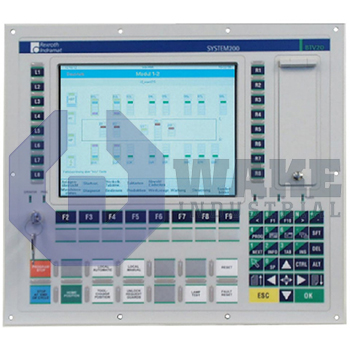
The Bosch Rexroth Indramat BTV20.2SA-28B-11D-D-FW is part of the BTV20 Machine Operator Panels series and operates with a DC 24 V input voltage. It is built with 128 MB of RAM, a standard keyboard, and provides 16 machine function keys. The panel includes a 3.5 inch disk drive with 1.44 MB capacity.
Internal Product Review
The BTV20.2SA-28B-11D-D-FW is a Bosch Rexroth Indramat machine operator panel with ISP panel functionality and a standard keyboard. Technical integration looks efficient with DC 24 V input and RS485 support in the base system configuration. Sixteen machine function keys add practical control depth, making the panel a strong choice for organized operator interaction.
 Have a part to sell?
 Wake Industrial Warranty
To contact sales for pricing and lead time:
Payment Methods


Shipping Methods


Our Credentials


Product Description:
The BTV20.2SA-28B-11D-D-FW operator panel belongs to the BTV20 Machine Operator Panels series from Bosch Rexroth Indramat. As a dedicated human-machine interface, the unit allows machine builders to integrate keypad, display, and communication functions into automated production cells, enabling operators to issue commands, monitor process values, and run diagnostics without opening the control cabinet. When connected to an IndraDrive or CNC platform, it serves as the local access point for everyday machine interaction and status display. That layout keeps routine operating tasks at the machine front while cabinet electronics remain enclosed.
Hardware resources include a minimum 1 GB internal storage device and a 200 MHz processor, which provide adequate capacity for interface tasks. Runtime data is stored in 128 MB of RAM, so screen updates and key scanning can be handled without noticeable delay. Front-mounted input is provided by 16 machine function keys, each available for direct PLC bit addressing. The electronics draw control power from a 24 V DC supply, allowing the panel to share the same low-voltage rail used by sensors and I/O modules. A standard membrane keyboard is integrated for alphanumeric entry. The keypad arrangement supports direct machine control functions without requiring a separate external operator station.
Nonvolatile file exchange is enabled through a factory-mounted 3.5-inch 1.44 MB disk drive behind the front door, which allows software files or parameter sets to be loaded when network access is unavailable. Communication with higher-level drives or PLCs can also be handled through the built-in RS-485 port, so existing serial connections remain supported. The enclosure uses Design 2, and the panel operates with the ISP function type for IndraControl SoftPanel services. The door-mounted media area gives access to removable storage without changing the panel's installed position.









